
DSC WS4936 PowerG Wireless Smoke and Heat Detector
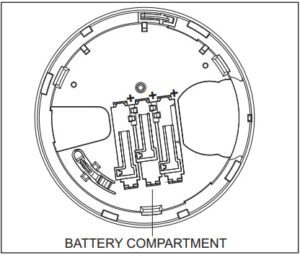
1. Remove the detector from its mounting base by twisting the detector counterclockwise. Carefully remove batteries by lifting from the “+” end using a flathead screwdriver and dispose of them according to local regulations.
2. To ensure a proper power-down sequence, wait a minimum of 30 seconds before installing new batteries.
3. Install 3 new AAA batteries in the battery compartment. Install the batteries by inserting the “-” end first, then pushing the “+” end down. If the batteries are incorrectly inserted, please remove them carefully by lifting them out from the “+” end and correctly reinserting them.
4. Re-install the detector on its mounting base by turning the detector clockwise until the mating marks align.
5. After the power-up sequence, the green LED should blink once every 60 seconds to indicate normal operation. If the batteries are not installed correctly, the detector will not operate and the batteries may be damaged. If the detector does not power up, check that the batteries are installed correctly and fully charged.
NOTE: Battery trouble could take up to 15 minutes to clear.