
Simon XT—Battery Replacement
The Simon XT requires a 6-volt 1.2 amp battery. This battery can often be purchased from Indiana Alarm or battery store, or If you need further assistance, you can call a Support Representative any time at 317-399-5748
Step-by-Step Instructions:
1. Remove the top screw, then press the two tabs to open the front cover.

2. Flip the front cover down to access the battery clips.

3. Apply pressure to spread the battery clips, then disconnect and remove the battery.
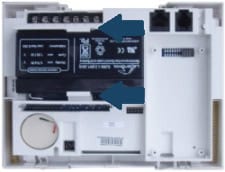
4. Install your new battery, ensuring the red terminal connects to the red wire and the black terminal connects to the black wire.

Once the battery has been replaced, you may need to wait for up to 24 hours until it has sufficient charge.
Clearing the Panel Alert:
See instructions below for how to clear the error alert and stop alert beeping on your panel.
1. Press the Status button.
2. Press the Disarm button to clear the trouble.
If you need further assistance, you can call a Support Representative at any time at 317-399-5748.