
Ecolink TX-E101/201 Battery Replacement
When it is time to replace the battery in your Ecolink TX-E101/102 keyfob, you will see an alert on your system panel.
Follow the instructions below to replace your keyfob battery and clear the alert from your system. The TX-E101/102 keyfob requires a CR2032 3-volt lithium battery, which can be purchased form Indiana Alarm, local hardware store, mass retailer, or battery store.
Step-by-Step Instructions:
1. Push on the black tab, then pull the keyfob up to remove it from the metal holder.
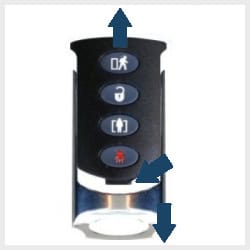
2. Insert a coin into the slot on the bottom left of the keyfob and twist it to open.
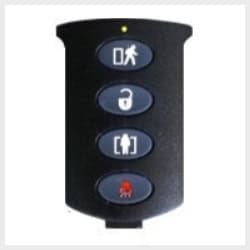
3. Slide the CR2032 battery out of its holder to remove and replace it.
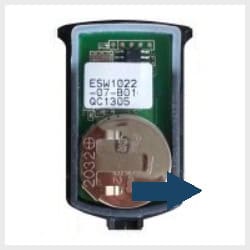
4. Check if the low battery status has cleared or go to the following link for further instructions on clearing the error from the panel memory.